deseq2
This module is a partial port of the R Bioconductor DESeq2 package [Love2014].
>>> from inmoose.deseq2 import *
>>> import patsy
>>> import numpy as np
>>> import matplotlib.pyplot as plt
>>> import pandas as pd
>>> import scipy
Quick start
Here we show the most basic steps for a differential expression analysis. There
are a variety of steps upstream of DESeq2 that result in the generation of
counts or estimated counts for each sample, which we will discuss in the
sections below. This code chunk assumes that you have a count matrix called
cts and a table of sample information called coldata. The
design indicates how to model the samples, here, that we want to measure
the effect of the condition, controlling for batch differences. The two factor
variables batch and condition should be columns of
coldata:
>>> dds = DESeqDataSet(countData = cts,
...                    clinicalData = coldata,
...                    design = "~ batch + condition")
>>> dds = DESeq(dds)
>>> # list the coefficients
>>> dds.resultsNames()
>>> res = dds.results(name = "condition_trt_vs_untrt")
>>> # or to shrink the log fold changes association with condition
>>> res = dds.lfcShrink(coef = "condition_trt_vs_untrt", type = "apeglm")
Input data
Why un-normalized counts?
As input, the DESeq2 package expects count data as obtained, e.g. from RNA-seq or another high-throughput sequencing experiment, in the form of a matrix of integer values. The value in the \(i\)-th row and the \(j\)-th column of the matrix tells how many reads can be assigned to gene \(i\) in sample \(j\). Analogously, for other types of assays, the rows of the matrix might correspond e.g. to binding regions (with ChIP-Seq) or peptide sequences (with quantitative mass spectrometry). We will list method for obtaining count matrices in sections below.
The values in the matrix should be un-normalized counts or estimated counts of sequencing reads (for single-end RNA-seq) or fragments (for paired-end RNA-seq). The RNA-seq workflow describes multiple techniques for preparing such count matrices. It is important to provide count matrices as input for DESeq2’s statistical model [Love2014] to hold, as only the count values allow assessing the measurement precision correctly. The DESeq2 model internally corrects for library size, so transformed or normalized values such as counts scaled by library size should not be used as input.
The DESeqDataSet
The object class used by the DESeq2 package to store the read counts and the
intermediate estimated quantities during statistical analysis is the
DESeqDataSet, which will usually be represented in the
code here as an object dds.
A technical detail is that the DESeqDataSet class extends
the AnnData class of the anndata package.
A DESeqDataSet object must have an associated design
matrix. The design matrix expresses the variables which will be used in
modeling. The matrix is built from a formula starting with a tilde (~) followed
by the variables with plus signs between them (it will be coerced into a formula
if it is not already). The design can be changed later, however then all
differential analysis steps should be repeated, as the design formula is used to
estimate the dispersions and to estimate the log2 fold changes of the model.
Note
In order to benefit from the default settings of the package, you should put the variable of interest at the end of the formula and make sure the control level is the first level.
We will now show 2 ways of constructing a DESeqDataSet,
depending on what pipeline was used upstream of DESeq2 to generated counts or
estimated counts:
From a count matrix Count matrix input
From an
AnnDataobject AnnData input
Note
The original R package allows to build a DESeqDataSet
from transcript abundance files and htseq count files, but those features
have not yet been ported into inmoose.
Count matrix input
The constructor DESeqDataSet.__init__() can be used if you already have a
matrix of read counts prepared from another source. Another method for quickly
producing count matrices from alignment files is the featureCounts
function [Liao2013] in the Rsubread package. To use the constructor
of DESeqDataSet.__init__(), the user should provide the counts matrix,
the information about the samples (the rows of the count matrix) as a data
frame, and the design formula.
To demonstrate the construction of DESeqDataSet from a
count matrix, we will read in count data from the pasilla package, available in inmoose. We
read in a count matrix, which we will name cts, and the sample
information table, which we will name sample_data. Further below we
describe how to extract these objects from, e.g. featureCounts
output:
>>> import importlib.resources
>>> from inmoose.utils import Factor
>>>
>>> data_dir = importlib.resources.files("inmoose.data.pasilla")
>>> pasCts = data_dir.joinpath("pasilla_gene_counts.tsv")
>>> pasAnno = data_dir.joinpath("pasilla_sample_annotation.csv")
>>> cts = pd.read_csv(pasCts, sep='\t', index_col=0)
>>> sample_data = pd.read_csv(pasAnno, index_col=0)
>>> sample_data = sample_data[["condition", "type"]]
>>> sample_data["condition"] = Factor(sample_data["condition"])
>>> sample_data["type"] = Factor(sample_data["type"])
We examine the count matrix and sample data to see if they are consistent in terms of sample order:
>>> cts.head(2)
             untreated1  untreated2  untreated3  untreated4  treated1  \
gene_id
FBgn0000003           0           0           0           0         0
FBgn0000008          92         161          76          70       140

             treated2  treated3
gene_id
FBgn0000003         0         1
FBgn0000008        88        70
>>> sample_data
              condition         type
file
treated1fb      treated  single-read
treated2fb      treated   paired-end
treated3fb      treated   paired-end
untreated1fb  untreated  single-read
untreated2fb  untreated  single-read
untreated3fb  untreated   paired-end
untreated4fb  untreated   paired-end
Note that these are not in the same order with respect to samples!
It is absolutely critical that the rows of the count matrix and the rows of the sample data (information about samples) are in the same order. DESeq2 will not make guesses as to which row of the count matrix belongs to which row of the sample data, these must be provided to DESeq2 already in consistent order.
As they are not in the correct order as given, we need to re-arrange one or the
other so that they are consistent in terms of sample order (if we do not, later
functions would produce an error). We additionally need to chop off the “fb”
of the row names of sample_data, so the naming is consistent:
>>> sample_data.index = [i[:-2] for i in sample_data.index]
>>> all(sample_data.index.isin(cts.columns))
True
>>> all(sample_data.index == cts.columns)
False
>>> sample_data = sample_data.reindex(cts.columns)
>>> all(sample_data.index == cts.columns)
True
If you have used the featureCounts function [Liao2013] in the Rsubread package, the matrix of read counts
can be directly provided from the “counts” element in the list output. The
count matrix and sample data can typically be read into Python from flat files
using import functions from pandas or numpy.
With the count matrix, cts, and the sample information,
sample_data, we can construct a DESeqDataSet:
>>> dds = DESeqDataSet(countData = cts.T,
...                    clinicalData = sample_data,
...                    design = "~ condition")
>>> dds
AnnData object with n_obs × n_vars = 7 × 14599
    obs: 'condition', 'type', 'C(condition)'
    obsm: 'design'
If you have additional feature data, it can be added to the
DESeqDataSet by adding to the metadata columns of a newly
constructed object. (Here we add redundant data just for demonstration, as the
gene names are already the rownames of the dds.):
>>> featureData = dds.var.index
>>> dds.var["featureData"] = featureData
>>> dds.var.head()
             featureData
gene_id
FBgn0000003  FBgn0000003
FBgn0000008  FBgn0000008
FBgn0000014  FBgn0000014
FBgn0000015  FBgn0000015
FBgn0000017  FBgn0000017
AnnData input
If one has already created or obtained an AnnData, it can be easily
input into DESeq2 as follows. First we load the module containing the airway
dataset:
>>> from inmoose.data.airway import airway
>>> ad = airway()
The constructor function below shows the generation of a
DESeqDataSet from an AnnData ad:
>>> ddsAD = DESeqDataSet(ad, design = "~ cell + dex")
>>> ddsAD
AnnData object with n_obs × n_vars = 8 × 64102
    obs: 'SampleName', 'cell', 'dex', 'albut', 'Run', 'avgLength', 'Experiment', 'Sample', 'BioSample', 'C(cell)', 'C(dex)'
    obsm: 'design'
Pre-filtering
While it is not necessary to pre-filter low count genes before running the
DESeq2 functions, there are two reasons which make pre-filtering useful: by
removing rows in which there are very few reads, we reduce the memory size of
the dds data object, and we increase the speed of the transformation and
testing functions within DESeq2. It can also improve visualizations, as features
with no information for differential expression are not plotted.
Here we perform a minimal pre-filtering to keep only rows that have at least 10
reads total. Note that more strict filtering to increase power is
automatically applied via independent filtering on the mean of
normalized counts within the DESeqDataSet.results() function:
>>> keep = dds.counts().sum(axis=1) >= 10
>>> dds = dds[keep,:]
Alternatively, a popular filter is to ensure at least X samples with a
count of 10 or more, where X can be chosen as the sample size of the
smallest group of samples:
>>> keep = (dds.counts() >= 10).sum(axis=1) >= X
>>> dds = dds[keep,:]
Note on factor levels
By default, Python will choose a reference level for factors based on
alphabetical order, it chooses the first value as the reference. Then, if you
never tell the DESeq2 functions which level you want to compare against
(e.g. which level represents the control group), the comparisons will
be based on the alphabetical order of the levels. There are two
solutions: you can either explicitly tell DESeqDataSet.results() which
comparison to make using the contrast argument (this will be shown
later), or you can explicitly set the factors levels by specifying the desired
reference value first. In order to see the change of reference levels reflected
in the results names, you need to either run DESeq() or
nbinomWaldTest() / nbinomLRT() after the re-leveling operation.
Setting the factor levels can be done with the:code:reorder_categories function:
>>> dds.obs["condition"] = dds.obs["condition"].cat.reorder_categories(["untreated", "treated"])
If you need to subset the columns of a DESeqDataSet,
i.e. when removing certain samples from the analysis, it is possible that all
the samples for one or more levels of a variable in the design formula would be
removed. In this case, the remove_unused_categories function can be used
to remove those levels which do not have samples in the current
DESeqDataSet:
>>> dds.obs["condition"] = dds.obs["condition"].cat.remove_unused_categories()
Collapsing technical replicates
DESeq2 provides a function collapseReplicates() which can assist in
combining the counts from technical replicates into single columns of the count
matrix. The term technical replicate implies multiple sequencing runs of the
same library. You should not collapse biological replicates using this
function. See the manual page for an example of the use of
collapseReplicates().
About the pasilla dataset
We continue with the pasilla data constructed from the count matrix method above. This data set is from an experiment on Drosophila melanogaster cell cultures and investigated the effect of RNAi knock-down of the splicing factor pasilla [Brooks2011]. The detailed transcript of the production of the pasilla data is provided in the vignette of the data package pasilla.
Differential expression analysis
The standard differential expression analysis steps are wrapped into a single
function DESeq(). The estimation steps performed by this function are
described below, in the manual page for DESeq() and in the
Methods section of the DESeq2 publication [Love2014].
Results tables are generated using the function DESeqDataSet.results(),
which extracts a results table with log2 fold changes, p-values and adjusted
p-values. With no additional arguments to DESeqDataSet.results(), the
log2 fold change and Wald test p-value will be for the last variable in
the design formula, and if this is a factor, the comparison will be the last
level of this variable over the reference level (see previous note
on factor levels). However, the order of the variables of the
design does not matter so long as the user specifies the comparison to build a
results table for, using the name or contrast arguments of
DESeqDataSet.results().
Details about the comparison are printed to the console, directly above the results table. The text, condition treated vs untreated, tells you that the estimates are of the logarithmic fold change log2(treated/untreated):
>>> dds.design = "~ condition"
>>> dds = DESeq(dds)
[INFO] estimating size factors
[INFO] estimating dispersions
[INFO] gene-wise dispersion estimates
[INFO] mean-dispersion relationship
[INFO] final dispersion estimates
[INFO] fitting model and testing
>>> res = dds.results()
>>> res.head()
                baseMean  log2FoldChange     lfcSE      stat    pvalue  \
gene_id
FBgn0000003     0.171569        1.026014  3.805512  0.269613  0.787458
FBgn0000008    95.144079        0.002152  0.223884  0.009611  0.992332
FBgn0000014     1.056572       -0.496735  2.160267 -0.229942  0.818137
FBgn0000015     0.846723       -1.882765  2.106434 -0.893816  0.371420
FBgn0000017  4352.592899       -0.240025  0.126024 -1.904593  0.056833

             adj_pvalue
gene_id
FBgn0000003         NaN
FBgn0000008    0.996928
FBgn0000014         NaN
FBgn0000015         NaN
FBgn0000017    0.282363
Note that we could have specified the coefficient or contrast we want to build a results table for, using either of the following equivalent commands:
>>> res = dds.results(name="condition_treated_vs_untreated")
>>> res = dds.results(contrast=["condition","treated","untreated"])
One exception to the equivalence of these two commands, is that, using
contrast will additionally set to 0 the estimated LFC in a comparison of
two groups, where all of the counts in the two groups are equal to 0 (while
other groups have positive counts). As this may be a desired feature to have the
LFC in these cases set to 0, one can use contrast to build these results
tables. More information about extracting specific coefficients from a fitted
DESeqDataSet object can be found in the help page
DESeqDataSet.results(). The use of the contrast argument is also
further discussed below.
Log fold change shrinkage for visualization and ranking
Shrinkage of effect size (LFC estimates) is useful for visualization and ranking
of genes. To shrink the LFC, we pass the dds object to the function
lfcShrink(). Below we specify to use the apeglm method for effect
size shrinkage [Zhu2018], which improves on the previous estimator.
We provide the dds object and the name or number of the coefficient we
want to shrink, where the number refers to the order of the coefficient as it
appears in dds.resultsNames():
>>> dds.resultsNames()
>>> resLFC = dds.lfcShrink(coef="condition_treated_vs_untreated", type="apeglm")
>>> resLFC
Shrinkage estimation is discussed more in a later section.
p-values and adjusted p-values
We can order our results table by the smallest p-value:
>>> resOrdered = res.sort_values(by="pvalue")
We can summarize some basic tallies using the DESeqResults.summary()
function:
>>> print(res.summary())

out of 12359 with nonzero total read count
adjusted p-value < 0.1
LFC > 0 (up)       : 521, 4.22%
LFC < 0 (down)     : 540, 4.37%
outliers [1]       : 1, 0.01%
low counts [2]     : 4035, 32.65%
(mean count < 7)
[1] see 'cooksCutoff' argument of results()
[2] see 'independentFiltering' argument of results()
How many adjusted p-values were less than 0.1:
>>> (res.adj_pvalue < 0.1).sum()
np.int64(1061)
The DESeqDataSet.results() function contains a number of arguments to
customize the results table which is generated. You can read about these
arguments by looking up the documentation of DESeqDataSet.results().
Note that the DESeqDataSet.results() function automatically performs
independent filtering based on the mean of normalized counts for each gene,
optimizing the number of genes which will have an adjusted p-value below a
given FDR cutoff, alpha. Independent filtering is further discussed
below. By default the argument alpha is set to 0.1. If
the adjusted p-value cutoff will be a value other than 0.1, alpha
should be set to that value:
>>> res05 = dds.results(alpha=0.05)
>>> print(res05.summary())

out of 12359 with nonzero total read count
adjusted p-value < 0.05
LFC > 0 (up)       : 406, 3.29%
LFC < 0 (down)     : 432, 3.50%
outliers [1]       : 1, 0.01%
low counts [2]     : 3797, 30.72%
(mean count < 5)
[1] see 'cooksCutoff' argument of results()
[2] see 'independentFiltering' argument of results()

>>> (res05.adj_pvalue < 0.05).sum()
np.int64(838)
Exploring and exporting results
MA-plot
In DESeq2, the function DESeqResults.plotMA() shows the log2 fold changes
attributable to a given variable over the mean of normalized counts for all the
samples in the DESeqDataSet. Points will be colored red
if the adjusted p-value is less than 0.1. Points which fall out of the window
are plotted as open triangles pointing either up or down:
>>> res.plotMA(ylim=[-2,2])
<Axes: xlabel='mean of normalized counts', ylabel='log fold change'>
>>> plt.show()

It is more useful visualize the MA-plot for the shrunken log2 fold changes, which remove the noise associated with log2 fold changes from low count genes without requiring arbitrary filtering thresholds:
>>> resLFC.plotMA(ylim=[-2,2])
Traceback (most recent call last):
  File "<stdin>", line 1, in <module>
NameError: name 'resLFC' is not defined
>>> plt.show()
Alternative shrinkage estimators
The moderated log fold changes proposed by [Love2014] use a normal prior
distribution, centered on zero and with a scale that is fit to the data. The
shrunken log fold changes are useful for ranking and visualization, without the
need for arbitrary filters on low count genes. The normal prior can sometimes
produce too strong of shrinkage for certain datasets. In DESeq2 version 1.18, we
include two additional adaptive shrinkage estimators, available via the
type argument of lfcShrink().
The options for type are:
apeglmis the adaptive t prior shrinkage estimator from the apeglm package [Zhu2018]. As of version 1.28.0, it is the default estimator.ashris the adaptive shrinkage estimator from the ashr package [Stephens2016]. Here DESeq2 uses the ashr option to fit a mixture of Normal distributions to form the prior, withmethod="shrinkage".normal: is the the original DESeq2 shrinkage estimator, an adaptive Normal distribution as prior.
If the shrinkage estimator apeglm is used in published research, please
cite [Zhu2018].
If the shrinkage estimator ashr is used in published research, please
cite [Stephens2016].
In the LFC shrinkage code above, we specified
coef="condition_treated_vs_untreated". We can also just specify the
coefficient by the order that it appears in dds.resultsNames(), in this
case coef=2. For more details explaining how the shrinkage estimators
differ, and what kinds of designs, contrasts and output is provided by each, see
the extended section on shrinkage estimators:
>>> dds.resultsNames()
>>> # because we are interested in treated vs untreated, we set 'coef=2'
>>> resNorm = dds.lfcShrink(coef=2, type="normal")
>>> resAsh = dds.lfcShrink(coef=2, type="ashr")
Note
If there is unwanted variation present in the data (e.g. batch effects) it
is always recommended to correct for this, which can be accommodated in
DESeq2 by including in the design any known batch variables or by using
functions/packages such as pycombat_seq(), svaseq in sva [Leek2014] or the RUV
functions in RUVSeq [Risso2014]
to estimate variables that capture the unwanted variation. In addition, the
ashr developers have a specific method
for accounting for unwanted variation in combination with ashr [Gerard2020].
More information on results columns
Information about which variables and tests were used can be found by inspecting
the attribute description on the DESeqResults object:
>>> res.description
{'adj_pvalue': 'fdr_bh adjusted p-values'}
For a particular gene, a log2 fold change of -1 for condition treated vs
untreated means that the treatment induces a multiplicative change in observed
gene expression level of \(2^{-1} = 0.5\) compared to the untreated
condition. If the variable of interest is continuous-valued, then the reported
log2 fold change is per unit of change of that variable.
Note on p-values set to NA
Some values in the results table can be set to NA for one of the
following reasons:
If within a row, all samples have zero counts, the
baseMeancolumn will be zero, and the log2 fold change estimates, p-value and adjusted p-value will all be set toNA.If a row contains a sample with an extreme count outlier then the p-value and adjusted p-value will be set to
NA. These outlier counts are detected by Cook’s distance. Customization of this outlier filtering and description of functionality for replacement of outlier counts and refitting is described below.If a row is filtered by automatic independent filtering, for having a low mean normalized count, then only the adjusted p-value will be set to
NA. Description and customization of independent filtering is described below.
Exporting results to CSV files
A plain-text file of the results can be exported using the method
DESeqResults.to_csv(). We suggest using a descriptive file name
indicating the variable and level which were tested:
>>> resOrdered.to_csv("condition_treated_results.csv")
Exporting only the results which pass an adjusted p-value threshold can be accomplished by subsetting the results:
>>> resSig = resOrdered[resOrdered.adj_pvalue < 0.1]
>>> resSig.head()
                baseMean  log2FoldChange     lfcSE       stat         pvalue  \
gene_id
FBgn0039155   730.595806       -4.619013  0.168707 -27.378960  4.883814e-165
FBgn0025111  1501.410513        2.899864  0.126920  22.847895  1.533540e-115
FBgn0029167  3706.116531       -2.197000  0.096989 -22.652116  1.329688e-113
FBgn0003360  4343.035397       -3.179672  0.143526 -22.153943  9.557726e-109
FBgn0035085   638.232609       -2.560412  0.137295 -18.648966   1.287427e-77

                adj_pvalue
gene_id
FBgn0039155  4.064799e-161
FBgn0025111  6.381825e-112
FBgn0029167  3.688998e-110
FBgn0003360  1.988724e-105
FBgn0035085   2.143050e-74
Multi-factor designs
Experiments with more than one factor influencing the counts can be analyzed using design formula that include the additional variables. In fact, DESeq2 can analyze any possible experimental design that can be expressed with fixed effects terms (multiple factors, designs with interactions, designs with continuous variables, splines, and so on are all possible).
By adding variables to the design, one can control for additional variation in
the counts. For example, if the condition samples are balanced across
experimental batches, by including the batch factor to the design, one
can increase the sensitivity for finding differences due to condition.
There are multiple ways to analyze experiments when the additional variables are
of interest and not just controlling factors (see section on
interactions).
Experiments with many samples: in experiments with many samples (e.g. 50, 100, etc.) it is highly likely that there will be technical variation affecting the observed counts. Failing to model this additional technical variation will lead to spurious results. Many methods exist that can be used to model technical variation, which can be easily included in the DESeq2 design to control for technical variation which estimating effects of interest. See the RNA-seq workflow for examples of using RUV or SVA in combination with DESeq2. For more details on why it is important to control for technical variation in large sample experiments, see the following thread, also archived here by Frederik Ziebell.
The data in the pasilla module have a condition of interest (the column
condition), as well as information on the type of sequencing which was
performed (the column type), as we can see below:
>>> dds.obs
            condition         type C(condition)  sizeFactors
untreated1  untreated  single-read    untreated     1.138263
untreated2  untreated  single-read    untreated     1.793000
untreated3  untreated   paired-end    untreated     0.649547
untreated4  untreated   paired-end    untreated     0.751689
treated1      treated  single-read      treated     1.635575
treated2      treated   paired-end      treated     0.761270
treated3      treated   paired-end      treated     0.832653
We create a copy of the DESeqDataSet, so that we can
rerun the analysis using a multi-factor design:
>>> ddsMF = dds.copy()
We change the categories of type so it only contains letters. Be
careful when changing level names to use the same order as the current
categories:
>>> import re
>>> dds.obs["type"].cat.categories
Index(['paired-end', 'single-read'], dtype='object')
>>> dds.obs["type"].cat.rename_categories([re.sub("-.*", "", c) for c in dds.obs["type"].cat.categories])
untreated1    single
untreated2    single
untreated3    paired
untreated4    paired
treated1      single
treated2      paired
treated3      paired
Name: type, dtype: category
Categories (2, object): ['paired', 'single']
>>> dds.obs["type"].dtype.categories
Index(['paired-end', 'single-read'], dtype='object')
We can account for the different types of sequencing, and get a clearer picture
of the differences attributable to the treatment. As condition is the
variable of interest, we put it at the end of the formula. Thus the
DESeqDataSet.results() function will by default pull the
condition results unless contrast or name arguments are
specified.
Then we can re-run DESeq():
>>> ddsMF.design = "~ type + condition"
>>> ddsMF = DESeq(ddsMF)
[INFO] using pre-existing size factors
[INFO] estimating dispersions
[INFO] found already estimated dispersions, replacing these
[INFO] gene-wise dispersion estimates
[INFO] found already estimated gene-wise dispersions, removing these
[INFO] mean-dispersion relationship
[INFO] final dispersion estimates
[INFO] fitting model and testing
[INFO] found results columns, replacing these
Again, we access the results using the DESeqDataSet.results() function:
>>> resMF = ddsMF.results()
>>> resMF.head()
                baseMean  log2FoldChange     lfcSE      stat    pvalue  \
gene_id
FBgn0000003     0.171569        0.674556  3.871083  0.174255  0.861665
FBgn0000008    95.144079       -0.040673  0.222215 -0.183035  0.854771
FBgn0000014     1.056572       -0.084994  2.111820 -0.040247  0.967896
FBgn0000015     0.846723       -1.861063  2.263063 -0.822365  0.410869
FBgn0000017  4352.592899       -0.256130  0.111896 -2.289002  0.022079

             adj_pvalue
gene_id
FBgn0000003         NaN
FBgn0000008    0.951975
FBgn0000014         NaN
FBgn0000015         NaN
FBgn0000017    0.131909
It is also possible to retrieve the log2 fold changes, p-values and adjusted
p-values of variables other than the last one in the design. While in this
case, type is not biologically interesting as it indicates differences
across sequencing protocols, for other hypothetical designs, such as
~genotype + condition + genotype:condition, we may actually be
interested in the difference in baseline expression across genotype, which is
not the last variable in the design.
In any case, the contrast argument of the function
DESeqDataSet.results() takes a string list of length three: the name of
the variable, the name of the factor level for the numerator of the log2 ratio,
and the name of the factor level for the denominator. The contrast
argument can also take other forms, as described in the help page for
DESeqDataSet.results() and below:
>>> resMFType = ddsMF.results(contrast=("type", "single", "paired"))
Traceback (most recent call last):
  File "<stdin>", line 1, in <module>
  File "/home/docs/checkouts/readthedocs.org/user_builds/inmoose/envs/stable/lib/python3.12/site-packages/inmoose/deseq2/results.py", line 503, in results_dds
    res = cleanContrast(
          ^^^^^^^^^^^^^^
  File "/home/docs/checkouts/readthedocs.org/user_builds/inmoose/envs/stable/lib/python3.12/site-packages/inmoose/deseq2/results.py", line 1087, in cleanContrast
    raise ValueError(
ValueError: single and paired should be levels of type such that single and paired are contained in 'resultsNames(obj)'
>>> resMFType.head()
Traceback (most recent call last):
  File "<stdin>", line 1, in <module>
NameError: name 'resMFType' is not defined
If the variable is continuous or an interaction term (see section on
interactions) then the results can be extracted using the
name argument to DESeqDataSet.results(), where the name is one of
elements returned by dds.resultsNames().
Variations to the standard workflow
Wald test individual steps
The function DESeq() runs the following functions in order:
>>> dds = dds.estimateSizeFactors()
>>> dds = dds.estimateDispersions(dds)
>>> dds = nbinomWaldTest(dds)
Control features for estimating size factors
In some experiments, it may not be appropriate to assume that a minority of
features (genes) are affected greatly by the condition, such that the standard
median-ratio method for estimating the size factors will not provide correct
inference (the log fold changes for features that were truly un-changing will
not centered on zero). This is a difficult inference problem for any method, but
there is an important feature that can be used: the controlGenes
argument of DESeqDataSet.estimateSizeFactors(). If there is any prior
information about features (genes) that should not be changing with respect to
the condition, providing this set of features to controlGenes will
ensure that the log fold changes for these features will be centered around 0.
The paradigm then becomes:
>>> dds = dds.estimateSizeFactors(controlGenes=ctrlGenes)
>>> dds = DESeq(dds)
Contrasts
A contrast is a linear combination of estimated log2 fold changes, which can be
used to test if differences between groups are equal to zero. The simplest use
case for contrasts is an experimental design containing a factor with three
levels, say A, B and C. Contrasts enable the user to generate results for all 3
possible differences: log2 fold change of B vs A, of C vs A, and of C vs B. The
contrast argument of DESeqDataSet.results() function is used to
extract test results of log2 fold changes of interest, for example:
>>> dds.results(contrast=["condition","C","B"])
Log2 fold changes can also be added and subtracted by providing a list to the
contrast argument which has two elements: the names of the log2 fold
changes to add, and the names of the log2 fold changes to subtract. The names
used in the list should come from dds.resultsNames(). Alternatively, a
numeric vector of the length of dds.resultsNames() can be provided, for
manually specifying the linear combination of terms. A tutorial describing the use
of numeric contrasts for DESeq2 explains a general approach to comparing across
groups of samples. Demonstrations of the use of contrasts for various designs
can be found in the examples section of the help page
DESeqDataSet.results(). The mathematical formula that is used to
generate the contrasts can be found below.
Interactions
Interaction terms can be added to the design formula, in order to test, for example, if the log2 fold change attributable to a given condition is different based on another factor, for example if the condition effect differs across genotype.
Preliminary remarks
Many users begin to add interaction terms to the design formula, when in fact a much simpler approach would give all the results tables that are desired. We will explain this approach first, because it is much simpler to perform. If the comparisons of interest are, for example, the effect of a condition for different sets of samples, a simpler approach than adding interaction terms explicitly to the design formula is to perform the following steps:
combine the factors of interest into a single factor with all combinations of the original factors
change the design to include just this factor, e.g.
"~ group"
Using this design is similar to adding an interaction term, in that it models
multiple condition effects which can be easily extracted with
DESeqDataSet.results(). Suppose we have two factors genotype
(with values I, II, and III) and condition (with values A and B), and we
want to extract the condition effect specifically for each genotype. We could
use the following approach to obtain, e.g. the condition effect for genotype
I:
>>> dds.obs["group"] = Factor([f"{g}{c}" for (g,c) in zip(dds.obs["genotype"], dds.obs["condition"])])
>>> dds.design = "~ group"
>>> dds = DESeq(dds)
>>> dds.resultsNames()
>>> dds.results(contrast=["group", "IB", "IA"])
Adding interactions to the design
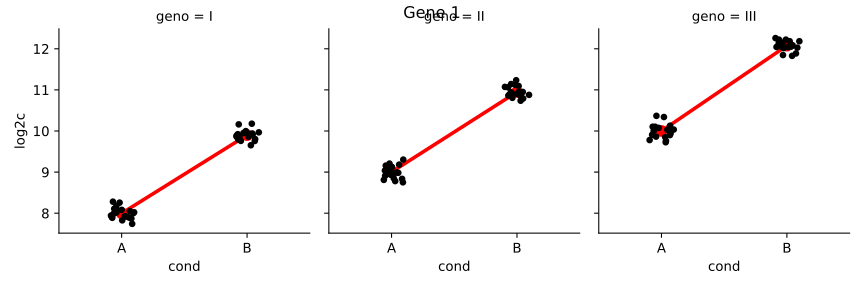
The following two plots diagram genotype-specific condition effects, which could
be modeled with interaction terms by using a design of ~genotype +
condition + genotype:condition.
In the first plot (Gene 1), note that the condition effect is consistent across
genotypes. Although condition A has a different baseline for I, II, and III, the
condition effect is a log2 fold change of about 2 for each genotype. Using a
model with an interaction term genotype:condition, the interaction terms
for genotype II and genotype III will be nearly 0.
Here, the y-axis represents \(\log(n+1)\), and each group has 20 samples (black dots). A red line connects the mean of the groups within each genotype.
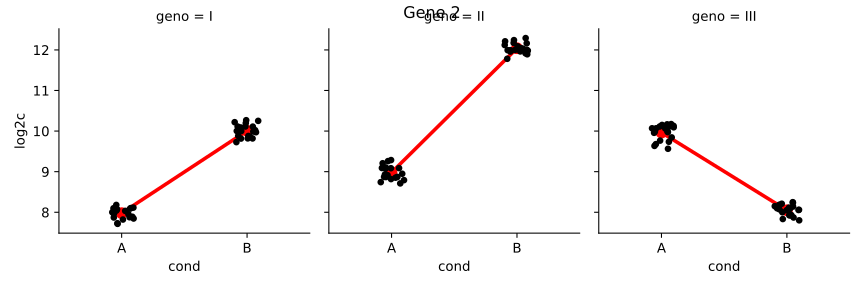
In the second plot (Gene 2), we can see that the condition effect is not
consistent across genotype. Here the main condition effect (the effect for the
reference genotype I) is again 2. However, this time the interaction terms will
be around 1 for genotype II and -4 for genotype III. This is because the
condition effect is higher by 1 for genotype II compared to genotype I, and
lower by 4 for genotype III compared to genotype I. The condition effect for
genotype II (or III) is obtained by adding the main condition effect and the
interaction term for that genotype. Such a plot can be made using the
plotCounts() function as shown above.
Now we will continue to explain the use of interactions in order to test for differences in condition effects. We continue with the example of condition effects across three genotypes (I, II, and III).
The key point to remember about designs with interaction terms is that, unlike
for a design ~genotype + condition, where the condition effect
represents the overall effect controlling for differences due to genotype, by
adding genotype:condition, the main condition effect only represents the
effect of condition for the reference level of genotype (I, or whichever level
was defined by the user as the reference level). The interaction terms
genotypeII.conditionB and genotypeIII.conditionB give the
difference between the condition effect for a given genotype and the condition
effect for the reference genotype.
This genotype-condition interaction example is examined in further detail in
Example 3 in the help page for DESeqDataSet.results(). In particular, we
show how to test for differences in the condition effect across genotype, and we
show how to obtain the condition effect for non-reference genotypes.
Time-series experiments
There are a number of ways to analyze time-series experiments, depending on the biological question of interest. In order to test for any differences over multiple time points, once can use a design including the time factor, and then test using the likelihood ratio test as described in the following section, where the time factor is removed in the reduced formula. For a control and treatment time series, one can use a design formula containing the condition factor, the time factor, and the interaction of the two. In this case, using the likelihood ratio test with a reduced model which does not contain the interaction terms will test whether the condition induces a change in gene expression at any time point after the reference level time point (time 0). An example of the later analysis is provided in the RNA-seq workflow.
Likelihood ratio test
DESeq2 offers two kinds of hypothesis tests: the Wald test, where we use the estimated standard error of a log2 fold change to test if it is equal to zero, and the likelihood ratio test (LRT). The LRT examines two models for the counts, a full model with a certain number of terms and a reduced model, in which some of the terms of the full model are removed. The test determines if the increased likelihood of the data using the extra terms in the full model is more than expected if those extra terms are truly zero.
The LRT is therefore useful for testing multiple terms at once, for example testing 3 or more levels of a factor at once, or all interactions between two variables. The LRT for count data is conceptually similar to an analysis of variance (ANOVA) calculation in linear regression, except that in the case of the Negative Binomial GLM, we use an analysis of deviance (ANODEV), where the deviance captures the difference in likelihood between a full and a reduced model.
The likelihood ratio test can be performed by specifying test="LRT" when
using the DESeq() function, and providing a reduced design formula, e.g.
one in which a number of terms from dds.design are removed. The degrees
of freedom for the test is obtained from the difference between the number of
parameters in the two models. A simple likelihood ratio test, if the full
design was ~condition would look like:
>>> dds = DESeq(dds, test="LRT", reduced="~1")
>>> res = dds.results()
If the full design contained other variables, such as a batch variable, e.g.
~batch + condition then the likelihood ratio test would look like:
>>> dds = DESeq(dds, test="LRT", reduced="~batch")
>>> res = dds.results()
Extended section on shrinkage estimators
Here we extend the discussion of shrinkage estimators. Below is
a summary table of differences between methods available in lfcShrink()
via the type argument (and for further technical reference on use of
arguments please the documentation of lfcShrink()):
method |
|
|
|
|---|---|---|---|
Good for ranking by LFC |
✓ |
✓ |
✓ |
Preserves size of large LFC |
✓ |
✓ |
|
Can compute s-values [Stephens2016] |
✓ |
✓ |
|
Allows use of |
✓ |
✓ |
✓ |
Allows use of |
✓ |
✓ |
✓ |
Allows use of |
✓ |
✓ |
|
Can shrink interaction terms |
✓ |
✓ |
Beginning with the first row, all shrinkage methods provided by DESeq2 are good for ranking genes by “effect size”, that is the log2 fold change (LFC) across groups, or associated with an interaction term. It is useful to contrast ranking by effect size with ranking by a p-value or adjusted p-value associated with a null hypothesis: while increasing the number of samples will tend to decrease the associated p-value for a gene that is differentially expressed, the estimated effect size or LFC becomes more precise. Also, a gene can have a small p-value although the change in expression is not great, as long as the standard error associated with the estimated LFC is small.
The next two rows point out that apeglm and ashr shrinkage
methods help to preserve the size of large LFC, and can be used to compute
s-values. These properties are related. As noted in the previous
section, the original DESeq2 shrinkage estimator used a Normal
distribution, with a scale that adapts to the spread of the observed LFCs.
Because the tails of the Normal distribution become thin relatively quickly, it
was important when we designed the method that the prior scaling is sensitive to
the very largest observed LFCs. As you can read in the DESeq2 paper, under the
section, “Empirical prior estimate”, we used the top 5% of the LFCs by
absolute value to set the scale of the Normal prior (we later added weighting
the quantile by precision). ashr, published in 2016, and apeglm
use wide-tailed priors to avoid shrinking large LFCs. While a typical RNA-seq
experiment may have many LFCs between -1 and 1, we might consider a LFC of >4 to
be very large, as they represent 16-fold increases or decreases in expression.
ashr and apeglm can adapt to the scale of the entirety of LFCs,
while not over-shrinking the few largest LFCs. The potential for over-shrinking
LFC is also why DESeq2’s shrinkage estimator is not recommended for designs with
interaction terms.
What are s-values? This quantity proposed by [Stephens2016] gives the estimated rate of false sign among genes with equal or smaller s-value. [Stephens2016] points out they are analogous to the q-value of [Storey2003]. The s-value has a desirable property relative to the adjusted p-value or q-value, in that it does not require supposing there be a set of null genes with LFC = 0 (the most commonly used null hypothesis). Therefore, it can be benchmarked by comparing estimated LFC and s-value to the “true LFC” in a setting where this can be reasonably defined. For these estimated probabilities to be accurate, the scale of the prior needs to match the scale of the distribution of effect sizes, and so the original DESeq2 shrinkage method is not really compatible with computing s-values.
The last four rows explain differences in whether coefficients or contrasts can
have shrinkage applied by the various methods. All three methods can use
coef with either the name or numeric index from
dds.resultsNames() to specify which coefficient to shrink. All three
methods allow for a positive lfcThreshold to be specified, in which
case, they will return p-values and adjusted p-values or s-values for the
LFC being greater in absolute value than the threshold (see this
section for normal). For apeglm and ashr,
setting a threshold means that the s-values will give the “false sign or
small” rate (FSOS) among genes with equal or small s-value. We found FSOS to
be a useful description for when the LFC is either the wrong sign or less than
the threshold distance from 0.
TODO
Finally, normal and ashr can be used with arbitrary specified
contrast because normal shrinks multiple coefficients
simultaneously (apeglm does not), and because ashr does not
estimate a vector of coefficients but models estimated coefficients and their
standard errors from upstream methods (here, DESeq2’s MLE). Although
apeglm cannot be used with contrast, we note that many designs
can be easily rearranged such that what was a contrast becomes its own
coefficient. In this case, the dispersion does not have to be estimated again,
as the designs are equivalent, up to the meaning of the coefficients. Instead,
one need only run nbinomWaldTest to re-estimate MLE coefficients –
these are necessary for apeglm – and then run lfcShrink
specifying the coefficient of interest in dds.resultsNames().
We give some examples below of producing equivalent designs for use with
coef. We show how the coefficients change with patsy.dmatrix,
but the user would, for example, either change the levels of dds.obs.condition
or replace the DESeqDataSet.design, then run nbinomWaldTest()
followed by lfcShrink().
Three groups:
>>> condition = Factor(["A", "A", "B", "B", "C", "C"])
>>> patsy.dmatrix("~condition")
DesignMatrix with shape (6, 3)
Intercept  condition[T.B]  condition[T.C]
        1               0               0
        1               0               0
        1               1               0
        1               1               0
        1               0               1
        1               0               1
Terms:
'Intercept' (column 0), 'condition' (columns 1:3)
>>> # to compare C vs B, make B the reference level,
>>> # and select the last coefficient
>>> condition = condition.reorder_categories(["B", "A", "C"])
>>> patsy.dmatrix("~condition")
DesignMatrix with shape (6, 3)
Intercept  condition[T.A]  condition[T.C]
        1               1               0
        1               1               0
        1               0               0
        1               0               0
        1               0               1
        1               0               1
Terms:
'Intercept' (column 0), 'condition' (columns 1:3)
Three groups, compare condition effects:
>>> grp = Factor([1,1,1,1,2,2,2,2,3,3,3,3])
>>> cnd = Factor(["A","A","B","B","A","A","B","B","A","A","B","B"])
>>> patsy.dmatrix("~ grp + cnd + grp:cnd")
DesignMatrix with shape (12, 6)
Columns:
['Intercept', 'grp[T.2]', 'grp[T.3]', 'cnd[T.B]', 'grp[T.2]:cnd[T.B]', 'grp[T.3]:cnd[T.B]']
Terms:
'Intercept' (column 0), 'grp' (columns 1:3), 'cnd' (column 3), 'grp:cnd' (columns 4:6)
(to view full data, use np.asarray(this_obj))
>>> # to compare condition effect in group 3 vs 2,
>>> # make group 2 the reference level,
>>> # and select the last coefficient
>>> grp = grp.reorder_categories([2,1,3])
>>> patsy.dmatrix("~ grp + cnd + grp:cnd")
DesignMatrix with shape (12, 6)
Columns:
['Intercept', 'grp[T.1]', 'grp[T.3]', 'cnd[T.B]', 'grp[T.1]:cnd[T.B]', 'grp[T.3]:cnd[T.B]']
Terms:
'Intercept' (column 0), 'grp' (columns 1:3), 'cnd' (column 3), 'grp:cnd' (columns 4:6)
(to view full data, use np.asarray(this_obj))
Two groups, two individuals per group, compare within-individual condition effects:
>>> grp = Factor([1,1,1,1,2,2,2,2])
>>> ind = Factor([1,1,2,2,1,1,2,2])
>>> cnd = Factor(["A","B","A","B","A","B","A","B"])
>>> patsy.dmatrix("~ grp + grp:ind + grp:cnd")
DesignMatrix with shape (8, 6)
Columns:
['Intercept', 'grp[T.2]', 'grp[1]:ind[T.2]', 'grp[2]:ind[T.2]', 'grp[1]:cnd[T.B]', 'grp[2]:cnd[T.B]']
Terms:
'Intercept' (column 0), 'grp' (column 1), 'grp:ind' (columns 2:4), 'grp:cnd' (columns 4:6)
(to view full data, use np.asarray(this_obj))
>>> # to compare condition effect across group,
>>> # add a main effect for 'cnd',
>>> # and select the last coefficient
>>> patsy.dmatrix("~ grp + cnd + grp:ind + grp:cnd")
DesignMatrix with shape (8, 6)
Columns:
['Intercept', 'grp[T.2]', 'cnd[T.B]', 'grp[1]:ind[T.2]', 'grp[2]:ind[T.2]', 'grp[T.2]:cnd[T.B]']
Terms:
'Intercept' (column 0), 'grp' (column 1), 'cnd' (column 2), 'grp:ind' (columns 3:5), 'grp:cnd' (column 5)
(to view full data, use np.asarray(this_obj))
Recommendations for single-cell analysis
The DESeq2 developers and collaborating groups have published recommendations for the best use of DESeq2 for single-cell datasets, which have been described first in [Berge2018]. Default values for DESeq2 were designed for bulk data and will not be appropriate for single-cell datasets. These settings and additional improvements have also been tested subsequently and published in [Zhu2018] and [AhlmannEltze2020].
Use
test="LRT"for significance testing when working with single-cell data, over the Wald test. This has been observed across multiple single-cell benchmarks.Set the following
DESeq()arguments to these values:useT=TRUE,minmu=1e-6, andminReplicatesForReplace=Inf. The default setting ofminmuwas benchmarked on bulk RNA-seq and is not appropriate for single cell data when the expected count is often much less than 1.The default size factors are not optimal for single cell count matrices, instead consider setting
DESeqDataSet.sizeFactorsfromscran::computeSumFactors.One important concern for single-cell data analysis is the size of the datasets and associated processing time. To address the speed concerns, DESeq2 provides an interface to glmGamPoi, which implements faster dispersion and parameter estimation routines for single-cell data [AhlmannEltze2020]. To use this feature, set
fitType = "glmGamPoi". Alternatively, one can use glmGamPoi as a standalone package. This provides the additional option to process data on-disk if the full dataset does not fit in memory, a quasi-likelihood framework for differential testing, and the ability to form pseudobulk samples (more details how to use glmGamPoi are in its README).
Optionally, one can consider using the zinbwave package to directly model the zero inflation of the counts, and take account of these in the DESeq2 model. This allows for the DESeq2 inference to apply to the part of the data which is not due to zero inflation. Not all single cell datasets exhibit zero inflation, and instead may just reflect low conditional estimated counts (conditional on cell type or cell state). There is example code for combining zinbwave and DESeq2 package functions in the zinbwave vignette. We also have an example of ZINB-WaVE + DESeq2 integration using the splatter package for simulation at the zinbwave-deseq2 GitHub repository.
Approach to count outliers
RNA-seq data sometimes contain isolated instances of very large counts that are apparently unrelated to the experimental or study design, and which may be considered outliers. There are many reasons why outliers can arise, including rare technical or experimental artifacts, read mapping problems in the case of genetically differing samples, and genuine, but rare biological events. In many cases, users appear primarily interested in genes that show a consistent behavior, and this is the reason why by default, genes that are affected by such outliers are set aside by DESeq2, or if there are sufficient samples, outlier counts are replaced for model fitting. These two behaviors are described below.
The DESeq() function calculates, for every gene and for every sample, a
diagnostic test for outliers called Cook’s distance. Cook’s distance is a
measure of how much a single sample is influencing the fitted coefficients for a
gene, and a large value of Cook’s distance is intended to indicate an outlier
count. The Cook’s distances are stored as a matrix available in
dds.layers["cooks"].
The DESeqDataSet.results() function automatically flags genes which
contain a Cook’s distance above a cutoff for samples which have 3 or more
replicates. The p-values and adjusted p-values for these genes are set to
NA. At least 3 replicates are required for flagging, as it is difficult
to judge which sample might be an outlier with only 2 replicates. This
filtering can be turned off with dds.results(cooksCutoff=FALSE).
With many degrees of freedom – i.e. many more samples than number of
parameters to be estimated – it is undesirable to remove entire genes from the
analysis just because their data include a single count outlier. When there are
7 or more replicates for a given sample, the DESeq() function will
automatically replace counts with large Cook’s distance with the trimmed mean
over all samples, scaled up by the size factor or normalization factor for that
sample. This approach is conservative, it will not lead to false positives, as
it replaces the outlier value with the value predicted by the null hypothesis.
This outlier replacement only occurs when there are 7 or more replicates, and
can be turned off with DESeq(dds, minReplicatesForReplace=Inf).
The default Cook’s distance cutoff for the two behaviors described above depends
on the sample size and number of parameters to be estimated. The default is to
use the 99% quantile of the \(F(p,m-p)\) distribution (with \(p\) the
number of parameters including the intercept and \(m\) the number of
samples). The default for gene flagging can be modified using the
cooksCutoff argument to the DESeqDataSet.results() function. For
outlier replacement, DESeq() preserves the original counts in
dds.counts() saving the replacement counts as a matrix named
"replaceCounts" in dds.layers. Note that with continuous
variables in the design, outlier detection and replacement is not automatically
performed, as our current methods involve a robust estimation of within-group
variance which does not extend easily to continuous covariates. However, users
can examine the Cook’s distances in dds.layers["cooks"], in order to
perform manual visualization and filtering if necessary.
Note
If there are very many outliers (e.g. many hundreds or thousands) reported
by res.summary(), one might consider further exploration to see if a
single sample or a few samples should be removed due to low quality. The
automatic outlier filtering/replacement is most useful in situations which
the number of outliers is limited. When there are thousands of reported
outliers, it might make more sense to turn off the outlier
filtering/replacement (DESeq() with
minReplicatesForReplace=np.inf and DESeqDataSet.results() with
cooksCutoff=FALSE) and perform manual inspection:
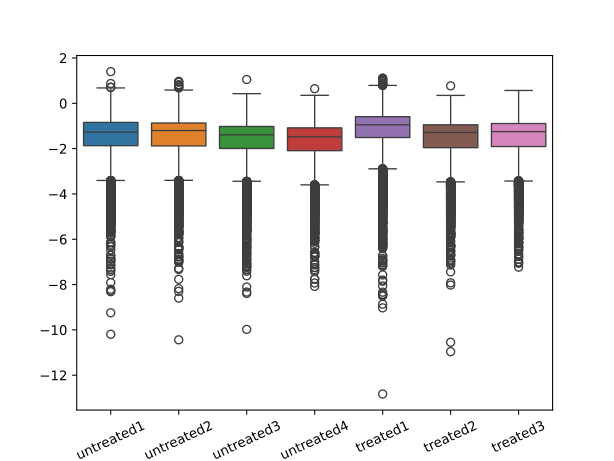
first it would be advantageous to make a PCA plot as described above to spot individual sample outliers;
second, one can make a boxplot of the Cook’s distances to see if one sample is consistently higher than others (here this is not the case):
>>> sns.boxplot(pd.DataFrame(np.log10(dds.layers["cooks"].T),
...                          columns=dds.obs_names))
<Axes: >
>>> plt.xticks(rotation=25)
([0, 1, 2, 3, 4, 5, 6], [Text(0, 0, 'untreated1'), Text(1, 0, 'untreated2'), Text(2, 0, 'untreated3'), Text(3, 0, 'untreated4'), Text(4, 0, 'treated1'), Text(5, 0, 'treated2'), Text(6, 0, 'treated3')])
>>> plt.show()
Dispersion plot and fitting alternatives
Plotting the dispersion estimates is a useful diagnostic. The dispersion plot
below is typical, with the final estimates shrunk from the gene-wise estimates
towards the fitted estimates. Some gene-wise estimates are flagged as outliers
and not shrunk towards the fitted value, (this outlier detection is described in
the manual page for estimateDispersionsMAP()). The amount
of shrinkage can be more or less than seen here, depending on the sample size,
the number of coefficients, the row mean and the variability of the gene-wise
estimates.
>>> dds.plotDispEsts()

Local or mean dispersion fit
A local smoothed dispersion fit is automatically substituted in the case that
the parametric curve does not fit the observed dispersion mean relationship.
This can be prespecified by providing the argument fitType="local" to
either DESeq() or DESeqDataSet.estimateDispersions().
Additionally, using the mean of gene-wise disperion estimates as the fitted
value can be specified by providing the argument fitType="mean".
Supply a custom dispersion fit
Any fitted values can be provided during dispersion estimation, using the
lower-level functions described in the manual page for
estimateDispersionsGeneEst(). In the code chunk below, we store the
gene-wise estimates which were already calculated and saved in the metadata
column dispGeneEst. Then we calculate the median value of the dispersion
estimates above a threshold, and save these values as the fitted dispersions,
using the replacement function for DESeqDataSet.dispersionFunction. In
the last line, the function estimateDispersionsMAP(), uses the fitted
dispersions to generate maximum a posteriori (MAP) estimates of dispersion:
>>> ddsCustom = dds.copy()
>>> useForMedian = ddsCustom.var["dispGeneEst"] > 1e-7
>>> medianDisp = np.nanmedian(ddsCustom.var["dispGeneEst"][useForMedian])
>>> ddsCustom.setDispFunction(lambda mu: medianDisp)
AnnData object with n_obs × n_vars = 7 × 14599
    obs: 'condition', 'type', 'C(condition)', 'sizeFactors'
    var: 'featureData', 'baseMean', 'baseVar', 'allZero', 'dispGeneEst', 'dispGeneIter', 'dispersion', 'dispIter', 'dispOutlier', 'dispMAP', 'Intercept', 'condition_treated_vs_untreated', 'SE_Intercept', 'SE_condition_treated_vs_untreated', 'WaldStatistic_Intercept', 'WaldStatistic_condition_treated_vs_untreated', 'WaldPvalue_Intercept', 'WaldPvalue_condition_treated_vs_untreated', 'betaConv', 'betaIter', 'deviance', 'maxCooks', 'dispFit'
    obsm: 'design'
    layers: 'mu', 'H', 'cooks'
>>> ddsCustom = estimateDispersionsMAP(ddsCustom)
[INFO] found already estimated dispersions, removing these
Traceback (most recent call last):
  File "/home/docs/checkouts/readthedocs.org/user_builds/inmoose/envs/stable/lib/python3.12/site-packages/pandas/core/indexes/base.py", line 3812, in get_loc
    return self._engine.get_loc(casted_key)
           ^^^^^^^^^^^^^^^^^^^^^^^^^^^^^^^^
  File "pandas/_libs/index.pyx", line 167, in pandas._libs.index.IndexEngine.get_loc
  File "pandas/_libs/index.pyx", line 196, in pandas._libs.index.IndexEngine.get_loc
  File "pandas/_libs/hashtable_class_helper.pxi", line 7088, in pandas._libs.hashtable.PyObjectHashTable.get_item
  File "pandas/_libs/hashtable_class_helper.pxi", line 7096, in pandas._libs.hashtable.PyObjectHashTable.get_item
KeyError: 'dispConv'

The above exception was the direct cause of the following exception:

Traceback (most recent call last):
  File "<stdin>", line 1, in <module>
  File "/home/docs/checkouts/readthedocs.org/user_builds/inmoose/envs/stable/lib/python3.12/site-packages/inmoose/deseq2/dispersions.py", line 632, in estimateDispersionsMAP
    del obj.var["dispConv"]
        ~~~~~~~^^^^^^^^^^^^
  File "/home/docs/checkouts/readthedocs.org/user_builds/inmoose/envs/stable/lib/python3.12/site-packages/pandas/core/generic.py", line 4528, in __delitem__
    loc = self.axes[-1].get_loc(key)
          ^^^^^^^^^^^^^^^^^^^^^^^^^^
  File "/home/docs/checkouts/readthedocs.org/user_builds/inmoose/envs/stable/lib/python3.12/site-packages/pandas/core/indexes/base.py", line 3819, in get_loc
    raise KeyError(key) from err
KeyError: 'dispConv'
Independent filtering of results
The DESeqDataSet.results() function of the DESeq2 package performs
independent filtering by default using the mean of normalized counts as a filter
statistic. A threshold on the filter statistic is found which optimizes the
number of adjusted p-values lower than a significance level alpha (we
use the standard variable name for significance level, though it is unrelated to
the dispersion parameter \(\alpha\)). The theory behind independent
filtering is discussed in greater detail below. The
adjusted p-values for the genes which do not pass the filter threshold are set
to NA.
The default independent filtering is performed using the
filtered_p() function of the genefilter package, and all of the
arguments of filtered_p() can be passed to the
DESeqDataSet.results() function. The filter threshold value and the
number of rejections at each quantile of the filter statistic are available as
metadata of the object returned by DESeqDataSet.results().
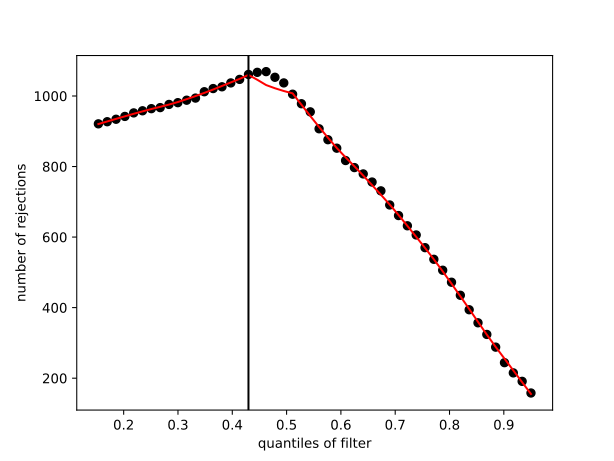
For example, we can visualize the optimization by plotting the
filterNumRej attribute of the results object. The
DESeqDataSet.results() function maximizes the number of rejections
(adjusted p-value less than a significance level), over the quantiles of a
filter statistic (the mean of normalized counts). The threshold chosen (vertical
line) is the lowest quantile of the filter for which the number of rejections is
within 1 residual standard deviation to the peak of a curve fit to the number of
rejections over the filter quantiles:
>>> res.alpha
0.1
>>> res.filterThreshold
np.float64(6.561688024950556)
>>> plt.plot(res.filterNumRej["theta"],
...          res.filterNumRej["numRej"],
...          'o', color="black")
[<matplotlib.lines.Line2D object at 0x716e9655d0d0>]
>>> plt.xlabel("quantiles of filter")
Text(0.5, 0, 'quantiles of filter')
>>> plt.ylabel("number of rejections")
Text(0, 0.5, 'number of rejections')
>>> plt.plot(res.lo_fit[:,0], res.lo_fit[:,1], color="red")
[<matplotlib.lines.Line2D object at 0x716e9653e750>]
>>> plt.axvline(x=res.filterTheta, color="black")
<matplotlib.lines.Line2D object at 0x716e968de8d0>
>>> plt.show()
Independent filtering can be turned off by setting independentFiltering
to FALSE.
>>> resNoFilt = dds.results(independentFiltering=False)
>>> df = pd.DataFrame({"filtering": (res.adj_pvalue < .1),
...                    "noFiltering": (resNoFilt.adj_pvalue < .1)})
>>> df.groupby(["filtering", "noFiltering"]).size()
filtering  noFiltering
False      False          13532
           True               6
True       False            146
           True             915
dtype: int64
Tests of log2 fold change above or below a threshold
It is also possible to provide thresholds for constructing Wald tests of
significance. Two arguments to the DESeqDataSet.results() function allow
for threshold-based Wald tests: lfcThreshold, which takes a numeric of a
non-negative threshold value, and altHypothesis, which specifies the
kind of test. Note that the alternative hypothesis is specified by the user,
i.e. those genes which the user is interested in finding, and the test
provides p-values for the null hypothesis, the complement of the set defined
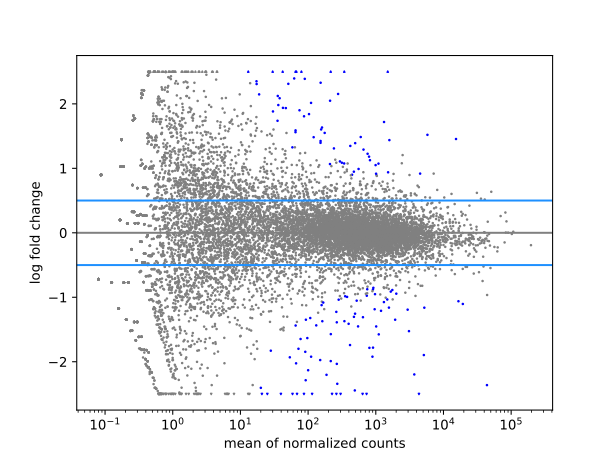
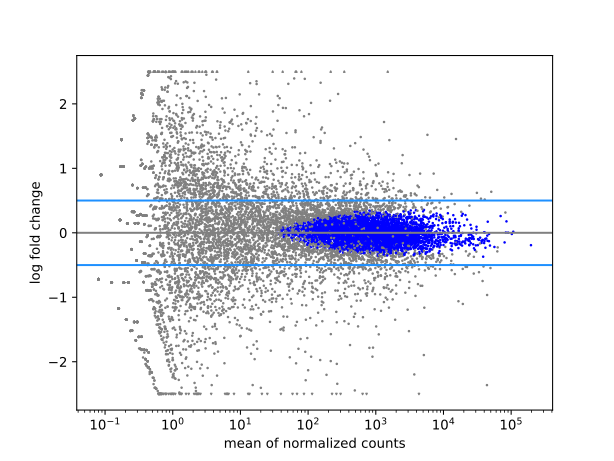
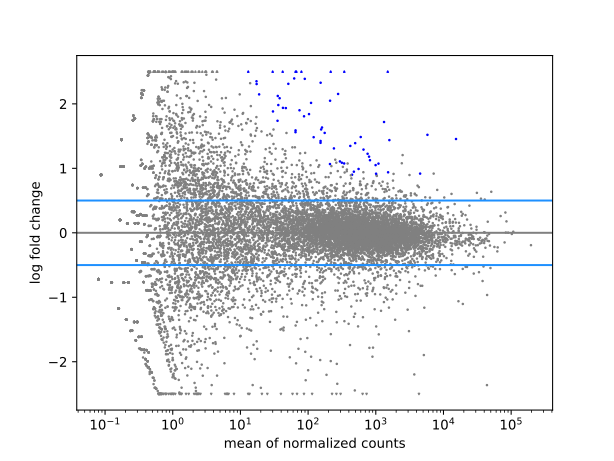
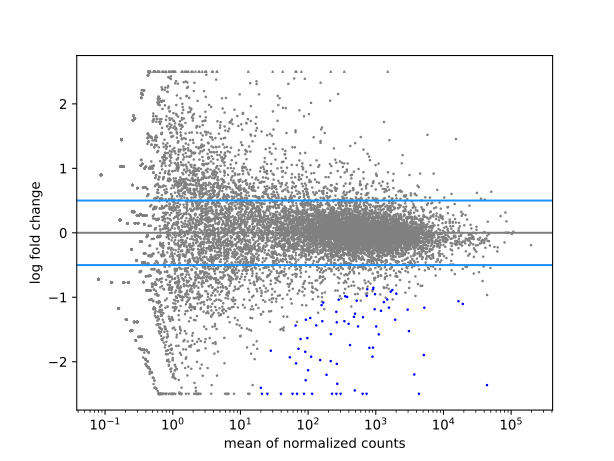
by the alternative. The altHypothesis argument can take one of the
following four values, where \(\beta\) is the log2 fold change specified by
the name argument, and \(x\) is the lfcThreshold.
greaterAbs - \(|\beta| > x\) - tests are two-tailed
lessAbs - \(|\beta| < x\) - p-values are the maximum of the upper and lower tests
greater - \(\beta > x\)
less - \(\beta < -x\)
The four possible values of altHypothesis are demonstrated in the
following code and visually by MA-plots in the following figures.
>>> ylim = [-2.5, 2.5]
>>> resGA = dds.results(lfcThreshold=.5, altHypothesis="greaterAbs")
>>> resLA = dds.results(lfcThreshold=.5, altHypothesis="lessAbs")
>>> resG = dds.results(lfcThreshold=.5, altHypothesis="greater")
>>> resL = dds.results(lfcThreshold=.5, altHypothesis="less")
>>>
>>> def drawlines(ax):
...   ax.axhline(y=-.5, c="dodgerblue")
...   ax.axhline(y=.5, c="dodgerblue")
...   plt.show()
...
>>> drawlines(resGA.plotMA(ylim=ylim))
>>> drawlines(resLA.plotMA(ylim=ylim))
>>> drawlines(resG.plotMA(ylim=ylim))
>>> drawlines(resL.plotMA(ylim=ylim))
Access to all calculated values
All row-wise calculated values (intermediate dispersion calculations,
coefficients, standard errors, etc.) are stored in the
DESeqDataSet object, e.g. dds in this vignette.
These values are accessible by inspecting the var attribute of
dds. Descriptions of the columns are accessible through the
description attribute:
>>> dds.var.iloc[:4,:4]
             featureData   baseMean     baseVar  allZero
gene_id
FBgn0000003  FBgn0000003   0.171569    0.206051    False
FBgn0000008  FBgn0000008  95.144079  224.623601    False
FBgn0000014  FBgn0000014   1.056572    2.962193    False
FBgn0000015  FBgn0000015   0.846723    1.008136    False
>>> dds.var.columns
Index(['featureData', 'baseMean', 'baseVar', 'allZero', 'dispGeneEst',
       'dispGeneIter', 'dispFit', 'dispersion', 'dispIter', 'dispOutlier',
       'dispMAP', 'Intercept', 'condition_treated_vs_untreated',
       'SE_Intercept', 'SE_condition_treated_vs_untreated',
       'WaldStatistic_Intercept',
       'WaldStatistic_condition_treated_vs_untreated', 'WaldPvalue_Intercept',
       'WaldPvalue_condition_treated_vs_untreated', 'betaConv', 'betaIter',
       'deviance', 'maxCooks'],
      dtype='object')
>>> dds.var.description
{'featureData': None, 'baseMean': 'mean of normalized counts for all samples', 'baseVar': 'variance of normalized counts for all samples', 'allZero': 'all counts for a gene are zero', 'dispGeneEst': 'gene-wise estimates of dispersion', 'dispGeneIter': 'number of iterations for gene-wise', 'dispFit': 'fitted values of dispersion', 'dispersion': 'final estimates of dispersion', 'dispIter': 'number of iterations', 'dispOutlier': 'dispersion flagged as outlier', 'dispMAP': 'maximum a posteriori estimate', 'betaConv': 'convergence of betas', 'betaIter': 'iterations for betas', 'deviance': 'deviance for the fitted model', 'maxCooks': "maximum Cook's distance for column", 'Intercept': 'log2 fold change (MLE): Intercept', 'condition_treated_vs_untreated': 'log2 fold change (MLE): condition_treated_vs_untreated', 'SE_Intercept': 'standard error: Intercept', 'SE_condition_treated_vs_untreated': 'standard error: condition_treated_vs_untreated', 'WaldStatistic_Intercept': 'Wald statistic: Intercept', 'WaldStatistic_condition_treated_vs_untreated': 'Wald statistic: condition_treated_vs_untreated', 'WaldPvalue_Intercept': 'Wald test p-value: Intercept', 'WaldPvalue_condition_treated_vs_untreated': 'Wald test p-value: condition_treated_vs_untreated'}
The mean values \(\mu_{ij} = s_j q_{ij}\) and the Cook’s distances for each
gene and sample are stored as matrices in the layers attribute:
>>> dds.layers["mu"]
array([[2.09559171e-01, 1.07292148e+02, 1.47236058e+00, ...,
        2.53923448e+03, 5.50599559e+03, 1.20359249e+01],
       [3.30099174e-01, 1.69007394e+02, 2.31927340e+00, ...,
        3.99982115e+03, 8.67308543e+03, 1.89590789e+01],
       [1.19584437e-01, 6.12260061e+01, 8.40199025e-01, ...,
        1.44900805e+03, 3.14198314e+03, 6.86827159e+00],
       ...,
       [6.13190540e-01, 1.54398672e+02, 1.49937358e+00, ...,
        3.68068351e+03, 7.99570296e+03, 1.93706657e+01],
       [2.85406290e-01, 7.18640444e+01, 6.97875495e-01, ...,
        1.71315465e+03, 3.72155760e+03, 9.01597376e+00],
       [3.12168313e-01, 7.86026038e+01, 7.63313998e-01, ...,
        1.87379401e+03, 4.07052122e+03, 9.86138505e+00]], shape=(7, 14599))
>>> dds.layers["cooks"]
array([[4.61806325e-02, 9.82223146e-02, 1.88372217e+00, ...,
        1.08058798e-02, 7.29748444e-02, 4.72189608e-01],
       [7.23979057e-02, 1.36367068e-02, 1.83811718e-01, ...,
        4.30828502e-02, 1.59022357e-02, 8.64898204e+00],
       [2.64472591e-02, 1.88984046e-01, 1.53810334e-01, ...,
        3.74539564e-02, 2.93982137e-04, 7.91730202e-01],
       ...,
       [2.34011866e-01, 8.83073697e-02, 1.88690327e+00, ...,
        8.57125537e-02, 4.59053853e-01, 6.18993372e+00],
       [1.03621920e-01, 3.03802008e-01, 2.18394316e-01, ...,
        5.59348959e-02, 1.58004358e-02, 1.03726935e+00],
       [5.49672768e-01, 7.77714976e-02, 2.51830834e-01, ...,
        3.04082671e-03, 3.03920686e-01, 9.00836358e-01]], shape=(7, 14599))
The dispersions \(\alpha_i\) can be accessed with the
DESeqDataSet.dispersions attribute:
>>> dds.dispersions.head()
gene_id
FBgn0000003    10.000000
FBgn0000008     0.030408
FBgn0000014     2.864891
FBgn0000015     2.209918
FBgn0000017     0.012832
Name: dispersion, dtype: float64
>>> dds.var["dispersion"].head()
gene_id
FBgn0000003    10.000000
FBgn0000008     0.030408
FBgn0000014     2.864891
FBgn0000015     2.209918
FBgn0000017     0.012832
Name: dispersion, dtype: float64
The size factors \(s_j\) are accessible via the
DESeqDataSet.sizeFactors attribute:
>>> dds.sizeFactors
untreated1    1.138263
untreated2    1.793000
untreated3    0.649547
untreated4    0.751689
treated1      1.635575
treated2      0.761270
treated3      0.832653
Name: sizeFactors, dtype: float64
For advanced users, we also include a convenience function coef() for
extracting the matrix \([\beta_{ir}]\) for all genes \(i\) and model
coefficients \(r\). This function can also return a matrix of standard
errors, see the documentation of coef(). The columns of this matrix
correspond to the effects returned by DESeqDataSet.resultsNames(). Note
that the DESeqDataSet.results() function is best for building results
tables with p-values and adjusted p-values:
>>> coef(dds).head()
Traceback (most recent call last):
  File "<stdin>", line 1, in <module>
NameError: name 'coef' is not defined
The beta prior variance \(\sigma_r^2\) is stored as an attribute of the
DESeqDataSet:
>>> dds.betaPriorVar
array([1000000., 1000000.])
General information about the prior used for log fold change shrinkage is also
stored in a slot of the DESeqResults object. This would also contain
information about what other packages were used for log2 fold change shrinkage:
>>> resLFC.priorInfo
Traceback (most recent call last):
  File "<stdin>", line 1, in <module>
NameError: name 'resLFC' is not defined. Did you mean: 'resMF'?
>>> resNorm.priorInfo
Traceback (most recent call last):
  File "<stdin>", line 1, in <module>
NameError: name 'resNorm' is not defined
>>> resAsh.priorInfo
Traceback (most recent call last):
  File "<stdin>", line 1, in <module>
NameError: name 'resAsh' is not defined
The dispersion prior variance \(\sigma_d^2\) is stored as an attribute of the dispersion function:
>>> dds.dispersionFunction
<function parametricDispersionFit.<locals>.ans at 0x716e9be122a0>
>>> dds.dispersionFunction.dispPriorVar
np.float64(0.4995079468728547)
Sample-/gene-dependent normalization factors
In some experiments, there might be gene-dependent dependencies which vary across samples. For instance, GC-content bias or length bias might vary across samples coming from different labs or processed at different times. We use the terms normalization factors for a gene x sample matrix, and size factors for a single number per sample. Incorporating normalization factors, the mean parameter \(\mu_{ij}\) becomes:
with normalization factor matrix \(NF\) having the same dimensions as the counts matrix \(K\). This matrix can be incorporated as shown below. We recommend providing a matrix with gene-wise geometric means of 1, so that the mean of normalized counts for a gene is close to the mean of the unnormalized counts. This can be accomplished by dividing out the current gene geometric means:
>>> normFactors = normFactors / np.exp(np.mean(np.log(normFactors), axis=0))
>>> dds.normalizationFactors = normFactors
These steps then replace DESeqDataSet.estimateSizeFactors() which occurs
within the DESeq() function. The DESeq() function will look for
pre-existing normalization factors and use these in the place of size factors
(and a message will be printed confirming this).
“Model matrix not full rank”
While most experimental designs run easily using design formula, some design
formulas can cause problems and result in the DESeq() function returning
an error with the text: “the model matrix is not full rank, so the model cannot
be fit as specified.” There are two main reasons for this problem: either one
or more columns in the model matrix are linear combinations of other columns, or
there are levels of factors or combinations of levels of multiple factors which
are missing samples. We address these two problems below and discuss possible
solutions.
Linear combinations
The simplest case is the linear combination, or linear dependency problem, when
two variables contain exactly the same information, such as in the following
sample table. The software cannot fit an effect for batch and
condition, because they produce identical columns in the model matrix.
This is also referred to as perfect confounding. A unique solution of
coefficients (the \(\beta_i\) in the formula below) is not
possible:
>>> pd.DataFrame({"batch": Factor([1,1,2,2]),
...               "condition": Factor(["A", "A", "B", "B"])})
  batch condition
0     1         A
1     1         A
2     2         B
3     2         B
Another situation which will cause problems is when the variables are not identical, but one variable can be formed by the combination of other factor levels. In the following example, the effect of batch 2 vs 1 cannot be fit because it is identical to a column in the model matrix which represents the condition C vs A effect:
>>> pd.DataFrame({"batch": Factor([1,1,1,1,2,2]),
...               "condition": Factor(["A", "A", "B", "B", "C", "C"])})
  batch condition
0     1         A
1     1         A
2     1         B
3     1         B
4     2         C
5     2         C
In both of these cases above, the batch effect cannot be fit and must be removed from the model formula. There is just no way to tell apart the condition effects and the batch effects. The options are either to assume there is no batch effect (which we know is highly unlikely given the literature on batch effects in sequencing datasets) or to repeat the experiment and properly balance the conditions across batches. A balanced design would look like:
>>> pd.DataFrame({"batch": Factor([1,1,1,2,2,2]),
...               "condition": Factor(["A", "B", "C", "A", "B", "C"])})
  batch condition
0     1         A
1     1         B
2     1         C
3     2         A
4     2         B
5     2         C
Group-specific condition effects, individuals nested within groups
Finally, there is a case where we can in fact perform inference, but we may need to re-arrange terms to do so. Consider an experiment with grouped individuals, where we seek to test the group-specific effect of a condition or treatment, while controlling for individual effects. The individuals are nested within the groups: an individual can only be in one of the groups, although each individual has one or more observations across condition.
An example of such an experiment is below:
>>> colData = pd.DataFrame({"grp": Factor(["X","X","X","X","X","X","Y","Y","Y","Y","Y","Y"]),
...                         "ind": Factor([1,1,2,2,3,3,4,4,5,5,6,6]),
...                         "cnd": Factor(["A","B","A","B","A","B","A","B","A","B","A","B"])})
>>> colData
   grp ind cnd
0    X   1   A
1    X   1   B
2    X   2   A
3    X   2   B
4    X   3   A
5    X   3   B
6    Y   4   A
7    Y   4   B
8    Y   5   A
9    Y   5   B
10   Y   6   A
11   Y   6   B
Note that individual (ind) is a factor not a numeric. This is very
important.
We have two groups of samples X and Y, each with three distinct individuals (labeled here 1-6). For each individual, we have conditions A and B (for example, this could be control and treated).
This design can be analyzed by DESeq2 but requires a bit of refactoring in order
to fit the model terms. Here we will use a trick described in the edgeR user guide, from the section
Comparisons Both Between and Within Subjects. If we try to analyze with a
formula such as, "~ ind + grp*cnd", we will obtain an error, because the
effect for group is a linear combination of the individuals.
However, the following steps allow for an analysis of group-specific condition
effects, while controlling for differences in individual. For object
construction, you can use a simple design, such as "~ ind + cnd", as
long as you remember to replace it before running DESeq(). Then add a
column ind_n which distinguishes the individuals nested within a group.
Here, we add this column to colData, but in practice you would add this
column to dds:
>>> colData["ind_n"] = Factor([1,1,2,2,3,3,1,1,2,2,3,3])
>>> colData
   grp ind cnd ind_n
0    X   1   A     1
1    X   1   B     1
2    X   2   A     2
3    X   2   B     2
4    X   3   A     3
5    X   3   B     3
6    Y   4   A     1
7    Y   4   B     1
8    Y   5   A     2
9    Y   5   B     2
10   Y   6   A     3
11   Y   6   B     3
Now we can reassign our DESeqDataSet a design of
"~ grp + grp:ind.n + grp:cnd", before we call DESeq(). This new
design will result in the following model matrix:
>>> patsy.dmatrix("~ grp + grp:ind_n + grp:cnd", colData)
DesignMatrix with shape (12, 8)
Columns:
['Intercept', 'grp[T.Y]', 'grp[X]:ind_n[T.2]', 'grp[Y]:ind_n[T.2]', 'grp[X]:ind_n[T.3]', 'grp[Y]:ind_n[T.3]', 'grp[X]:cnd[T.B]', 'grp[Y]:cnd[T.B]']
Terms:
'Intercept' (column 0), 'grp' (column 1), 'grp:ind_n' (columns 2:6), 'grp:cnd' (columns 6:8)
(to view full data, use np.asarray(this_obj))
Note that, if you have unbalanced numbers of individuals in the two groups, you
will have zeros for some of the interactions between grp and
ind.n. You can remove these columns manually from the model matrix and
pass the corrected model matrix to the full argument of the
DESeq() function. See example code in the next section. Note that, in this
case, you will not be able to create the DESeqDataSet
with the design that leads to less than full rank model matrix. You can either
use design="~1" when creating the dataset object, or you can provide the
corrected model matrix to the DESeqDataSet.design attribute of the
dataset from the start.
Above, the terms grpX.cndB and grpY.cndB give the group-specific
condition effects, in other words, the condition B vs A effect for group X
samples, and likewise for group Y samples. These terms control for all of the
six individual effects. These group-specific condition effects can be extracted
using DESeqDataSet.results() with the name argument.
Furthermore, grpX.cndB and grpY.cndB can be contrasted using the
contrast argument, in order to test if the condition effect is different
across group:
>>> dds.results(contrast=("grpY.cndB", "grpX.cndB"))
Levels without samples
The function patsy.dmatrix() will produce a column of zeros if a level is
missing from a factor or a combination of levels is missing from an interaction
of factors. The solution to the first case is to call
remove_unused_categories on the column, which will remove levels without
samples. This was shown in the beginning of this vignette.
The second case is also solvable, by manually editing the model matrix, and then
providing this to DESeq(). Here we construct an example dataset to
illustrate it:
>>> group = Factor([1,1,1,1,1,1,2,2,2,2,2,2,3,3,3,3,3,3])
>>> condition = Factor(["A","A","B","B","C","C","A","A","B","B","C","C","A","A","B","B","C","C"])
>>> d = pd.DataFrame({"group": group, "condition": condition})[:16]
>>> d
   group condition
0      1         A
1      1         A
2      1         B
3      1         B
4      1         C
5      1         C
6      2         A
7      2         A
8      2         B
9      2         B
10     2         C
11     2         C
12     3         A
13     3         A
14     3         B
15     3         B
Note that if we try to estimate all interaction terms, we introduce a column
with all zeros, as there are no condition C samples for group 3
(np.asarray is used to display the matrix):
>>> m1 = patsy.dmatrix("~condition*group", d)
>>> m1.design_info.column_names
['Intercept', 'condition[T.B]', 'condition[T.C]', 'group[T.2]', 'group[T.3]', 'condition[T.B]:group[T.2]', 'condition[T.C]:group[T.2]', 'condition[T.B]:group[T.3]', 'condition[T.C]:group[T.3]']
>>> np.asarray(m1)
array([[1., 0., 0., 0., 0., 0., 0., 0., 0.],
       [1., 0., 0., 0., 0., 0., 0., 0., 0.],
       [1., 1., 0., 0., 0., 0., 0., 0., 0.],
       [1., 1., 0., 0., 0., 0., 0., 0., 0.],
       [1., 0., 1., 0., 0., 0., 0., 0., 0.],
       [1., 0., 1., 0., 0., 0., 0., 0., 0.],
       [1., 0., 0., 1., 0., 0., 0., 0., 0.],
       [1., 0., 0., 1., 0., 0., 0., 0., 0.],
       [1., 1., 0., 1., 0., 1., 0., 0., 0.],
       [1., 1., 0., 1., 0., 1., 0., 0., 0.],
       [1., 0., 1., 1., 0., 0., 1., 0., 0.],
       [1., 0., 1., 1., 0., 0., 1., 0., 0.],
       [1., 0., 0., 0., 1., 0., 0., 0., 0.],
       [1., 0., 0., 0., 1., 0., 0., 0., 0.],
       [1., 1., 0., 0., 1., 0., 0., 1., 0.],
       [1., 1., 0., 0., 1., 0., 0., 1., 0.]])
>>> all_zero = (m1 == 0).all(axis=0)
>>> all_zero
array([False, False, False, False, False, False, False, False,  True])
We can remove this column like so:
>>> m1 = m1[:,~all_zero]
>>> m1
array([[1., 0., 0., 0., 0., 0., 0., 0.],
       [1., 0., 0., 0., 0., 0., 0., 0.],
       [1., 1., 0., 0., 0., 0., 0., 0.],
       [1., 1., 0., 0., 0., 0., 0., 0.],
       [1., 0., 1., 0., 0., 0., 0., 0.],
       [1., 0., 1., 0., 0., 0., 0., 0.],
       [1., 0., 0., 1., 0., 0., 0., 0.],
       [1., 0., 0., 1., 0., 0., 0., 0.],
       [1., 1., 0., 1., 0., 1., 0., 0.],
       [1., 1., 0., 1., 0., 1., 0., 0.],
       [1., 0., 1., 1., 0., 0., 1., 0.],
       [1., 0., 1., 1., 0., 0., 1., 0.],
       [1., 0., 0., 0., 1., 0., 0., 0.],
       [1., 0., 0., 0., 1., 0., 0., 0.],
       [1., 1., 0., 0., 1., 0., 0., 1.],
       [1., 1., 0., 0., 1., 0., 0., 1.]])
Now this matrix m1 can be provided to the full argument of
DESeq(). For a likelihood ratio test of interactions, a model matrix
using a reduced design such as "~ condition + group" can be given to the
reduced argument. Wald tests can also be generated instead of the
likelihood ratio test, but for user-supplied model matrices, the argument
betaPrior must be set to False.
Theory behind DESeq2
The DESeq2 model
The DESeq2 model and all the steps taken in the software are described in detail in our publication [Love2014], and we include the formula and descriptions in this section as well. The differential expression analysis in DESeq2 uses a generalized linear model of the form:
where counts \(K_{ij}\) for gene \(i\), sample \(j\) are modeled using a negative binomial distribution with fitted mean \(\mu_{ij}\) and a gene-specific dispersion parameter \(\alpha_i\). The fitted mean is composed of a sample-specific size factor \(s_j\) and a parameter \(q_{ij}\) proportional to the expected true concentration of fragments for sample \(j\). The coefficients \(\beta_i\) give the log2 fold changes for gene \(i\) for each column of the model matrix \(X\). Note that the model can be generalized to use sample- and gene-dependent normalization factors \(s_{ij}\).
The dispersion parameter \(\alpha_i\) defines the relationship between the variance of the observed count and its mean value. In other words, how far do we expected the observed count will be from the mean value, which depends both on the size factor \(s_j\) and the covariate-dependent part \(q_{ij}\) as defined above.
An option in DESeq2 is to provide maximum a posteriori estimates of the log2
fold changes in \(\beta_i\) after incorporating a zero-centered Normal prior
(betaPrior). While previously, these moderated, or shrunken, estimates
were generated by DESeq() or nbinomWaldTest() functions, they are
now produced by the lfcShrink() function. Dispersions are estimated using
expected mean values from the maximum likelihood estimate of log2 fold changes,
and optimizing the Cox-Reid adjusted profile likelihood, as first implemented
for RNA-seq data in edgeR
[@CR,edgeR_GLM]. The steps performed by the DESeq() function are
documented in its manual page; briefly, they are:
estimation of size factors \(s_j\) by
DESeqDataSet.estimateSizeFactors()estimation of dispersion \(\alpha_i\) by
DESeqDataSet.estimateDispersions()negative binomial GLM fitting for \(\beta_i\) and Wald statistics by
nbinomWaldTest()
For access to all the values calculated during these steps, see the section above.
Changes compared to R DESeq2
This module is a Python port of the R package DESeq2. The port is based on version 1.39.3, and changes to the R package since this version have not been reflected in the present module. Also note that the port is partial: not all features may have been ported yet. To help us prioritize our future focus, please open a “feature request” issue on inmoose GitHub repository.
The present page mirrors DESeq2 vignette, and despite our efforts, some code examples may not accurately reflect the state of the Python module.
The main changes in this module compared to the original DESeq2 package are as follows:
anndata.AnnDatais used as the superclass for storage of input data, intermediate calculations and results.
Methods changes since the 2014 DESeq2 paper
Note
The changes below are present in the R DESeq2 package, and “we” stands for the authors of the R package, not the authors of InMoose.
In version 1.18 (November 2017), we add two alternative shrinkage estimators, which can be used via
lfcShrink(): an estimator using a t prior from the apeglm packages, and an estimator with a fitted mixture of normals prior from the ashr package.In version 1.16 (November 2016), the log2 fold change shrinkage is no longer default for the
DESeq()andnbinomWaldTest()functions, by setting the defaults of these tobetaPrior=FALSE, and by introducing a separate functionlfcShrink(), which performs log2 fold change shrinkage for visualization and ranking of genes. While for the majority of bulk RNA-seq experiments, the LFC shrinkage did not affect statistical testing, DESeq2 has become used as an inference engine by a wider community, and certain sequencing datasets show better performance with the testing separated from the use of the LFC prior. Also, the separation of LFC shrinkage to a separate functionlfcShrink()allows for easier methods development of alternative effect size estimators.A small change to the independent filtering routine: instead of taking the quantile of the filter (the mean of normalized counts) which directly maximizes the number of rejections, the threshold chosen is the lowest quantile of the filter for which the number of rejections is close to the peak of a curve fit to the number of rejections over the filter quantiles. “Close to” is defined as within 1 residual standard deviation. This change was introduced in version 1.10 (October 2015).
For the calculation of the beta prior variance, instead of matching the empirical quantile to the quantile of a Normal distribution, DESeq2 now uses the weighted quantile function of the Hmisc package. The weighting is described in the manual page for
nbinomWaldTest(). The weights are the inverse of the expected variance of log counts (as used in the diagonals of the matrix \(W\) in the GLM). The effect of the change is that the estimated prior variance is robust against noisy estimates of log fold change from genes with very small counts. This change was introduced in version 1.6 (October 2014).
Count outlier detection
DESeq2 relies on the negative binomial distribution to make estimates and
perform statistical inference on differences. While the negative binomial is
versatile in having a mean and dispersion parameter, extreme counts in
individual samples might not fit well to the negative binomial. For this reason,
we perform automatic detection of count outliers. We use Cook’s distance, which
is a measure of how much the fitted coefficients would change if an individual
sample were removed [Cook1977]. For more on the implementation of Cook’s
distance see the manual page for the DESeqDataSet.results() function.
Below we plot the maximum value of Cook’s distance for each row over the rank of
the test statistic to justify its use as a filtering criterion.
>>> W = res["stat"]
>>> maxCooks = dds.layers["cooks"].max(axis=0)
>>> idx = ~np.isnan(W)
>>> plt.scatter(np.argsort(W[idx]), maxCooks[idx], c="grey")
<matplotlib.collections.PathCollection object at 0x716e96133d10>
>>> plt.xlabel("rank of Wald statistic")
Text(0.5, 0, 'rank of Wald statistic')
>>> plt.ylabel("maximum Cook's distance per gene")
Text(0, 0.5, "maximum Cook's distance per gene")
>>> m = dds.n_obs
>>> p = 3
>>> plt.axhline(y = scipy.stats.f.ppf(.99, p, m-p))
<matplotlib.lines.Line2D object at 0x716e965d0dd0>
>>> plt.show()
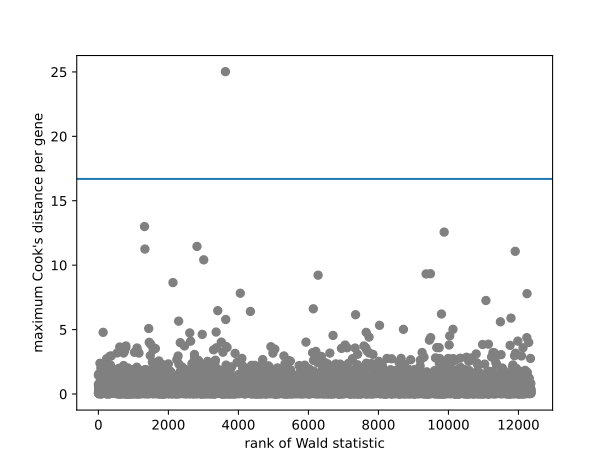
Contrasts
Contrasts can be calculated for a DESeqDataSet object for
which the GLM coefficients have already been fit using the Wald test steps
(DESeq() with test="Wald" or using nbinomWaldTest()). The
vector of coefficients \(\beta\) is left multiplied by the contrast vector
\(c\) to form the numerator of the test statistic. The denominator is formed
by multiplying the covariance matrix \(\Sigma\) for the coefficients on
either side by the contrast vector \(c\). The square root of this product is
an estimate of the standard error for the contrast. The contrast statistic is
then compared to a Normal distribution as are the Wald statistics for the DESeq2
package.
Expanded model matrices
For the specific combination of lfcShrink() with the type normal
and using contrast, DESeq2 uses expanded model matrices to produce
shrunken log2 fold change estimates where the shrinkage is independent of the
choice of reference level. In all other cases, DESeq2 uses standard model
matrices, as produced by patsy.dmatrix(). The expanded model matrices
differ from the standard model matrices, in that they have an indicator column
(and therefore a coefficient) for each level of factors in the design formula in
addition to an intercept. This is described in the DESeq2 paper. Using type
normal with coef() uses standard model matrices, as does the
apeglm shrinkage estimator.
Independent filtering and multiple testing
Filtering criteria
The goal of independent filtering is to filter out those tests from the procedure that have no, or little chance of showing significant evidence, without even looking at their test statistic. Typically, this results in increased detection power at the same experiment-wide type I error. Here, we measure experiment-wide type I error in terms of the false discovery rate.
A good choice for a filtering criterion is one that:
is statistically independent from the test statistic under the null hypothesis,
is correlated with the test statistic under the alternative, and
does not notably change the dependence structure – if there is any – between the tests that pass the filter, compared to the dependence structure between the tests before filtering.
The benefit from filtering relies on property (2), and we will explore it further below. Its statistical validity relies on property (1) – which is simple to formally prove for many combinations of filter criteria with test statistics – and (3), which is less easy to theoretically imply from first principles, but rarely a problem in practice. We refer to [Bourgon2010] for further discussion of this topic.
A simple filtering criterion readily available in the results object is the mean
of normalized counts irrespective of biological condition, and so this is the
criterion which is used automatically by the DESeqDataSet.results()
function to perform independent filtering. Genes with very low counts are not
likely to see significant differences typically due to high dispersion. For
example, we can plot the \(-\log_{10}\) p-values from all genes over the
normalized mean counts:
>>> plt.scatter(res["baseMean"]+1, -np.log10(res["pvalue"]), c="black")
<matplotlib.collections.PathCollection object at 0x716e96146540>
>>> plt.xscale("log")
>>> plt.xlabel("mean of normalized counts")
Text(0.5, 0, 'mean of normalized counts')
>>> plt.ylabel("-log[10](pvalue)")
Text(0, 0.5, '-log[10](pvalue)')
>>> plt.ylim(0,30)
(0.0, 30.0)
>>> plt.show()
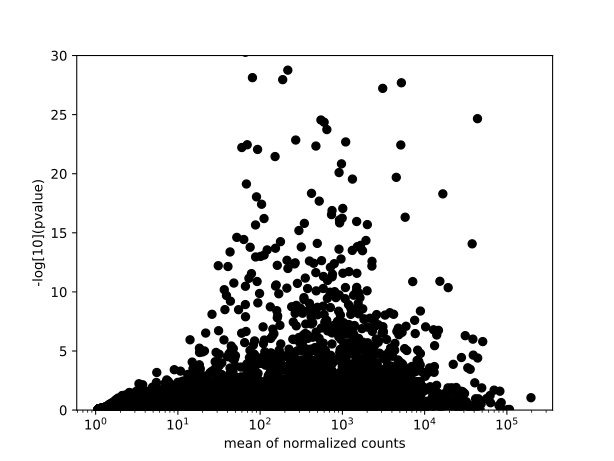
Why does it work?
Consider the p-value histogram below: it shows how the filtering ameliorates the multiple testing problem – and thus the severity of a multiple testing adjustment – by removing a background set of hypotheses whose p-values are distributed more or less uniformly in [0,1].
>>> use = res["baseMean"] > res.filterThreshold
>>> plt.hist(res["pvalue"][~use], bins=50, color="khaki", label="do not pass")
(array([ 13.,  13.,  13.,  14.,  17.,  18.,  20.,  30.,  22.,  22.,  34.,
        29.,  19.,  42.,  52.,  33.,  38.,  45.,  53.,  49.,  55.,  43.,
        46.,  67.,  69.,  78.,  61.,  60.,  96.,  87.,  75., 106.,  96.,
        80., 105., 152., 109., 108.,  70., 201., 281., 320., 253., 114.,
        87.,  75., 157., 154., 168.,  86.]), array([6.58819214e-04, 2.06309576e-02, 4.06030960e-02, 6.05752344e-02,
       8.05473727e-02, 1.00519511e-01, 1.20491649e-01, 1.40463788e-01,
       1.60435926e-01, 1.80408065e-01, 2.00380203e-01, 2.20352341e-01,
       2.40324480e-01, 2.60296618e-01, 2.80268757e-01, 3.00240895e-01,
       3.20213033e-01, 3.40185172e-01, 3.60157310e-01, 3.80129448e-01,
       4.00101587e-01, 4.20073725e-01, 4.40045864e-01, 4.60018002e-01,
       4.79990140e-01, 4.99962279e-01, 5.19934417e-01, 5.39906555e-01,
       5.59878694e-01, 5.79850832e-01, 5.99822971e-01, 6.19795109e-01,
       6.39767247e-01, 6.59739386e-01, 6.79711524e-01, 6.99683662e-01,
       7.19655801e-01, 7.39627939e-01, 7.59600078e-01, 7.79572216e-01,
       7.99544354e-01, 8.19516493e-01, 8.39488631e-01, 8.59460770e-01,
       8.79432908e-01, 8.99405046e-01, 9.19377185e-01, 9.39349323e-01,
       9.59321461e-01, 9.79293600e-01, 9.99265738e-01]), <BarContainer object of 50 artists>)
>>> plt.hist(res["pvalue"][use], bins=50, color="powderblue", label="pass")
(array([1183.,  295.,  234.,  194.,  184.,  167.,  170.,  144.,  145.,
        136.,  156.,  123.,  149.,  131.,  137.,  144.,  151.,  155.,
        146.,  151.,  132.,  143.,  133.,  144.,  145.,  123.,  151.,
        159.,  142.,  118.,  128.,  120.,  150.,  120.,  144.,  117.,
        120.,  127.,  128.,  139.,  139.,  145.,  135.,  109.,  144.,
        115.,  141.,  154.,  143.,  120.]), array([4.88381414e-165, 1.99951477e-002, 3.99902954e-002, 5.99854431e-002,
       7.99805908e-002, 9.99757385e-002, 1.19970886e-001, 1.39966034e-001,
       1.59961182e-001, 1.79956329e-001, 1.99951477e-001, 2.19946625e-001,
       2.39941772e-001, 2.59936920e-001, 2.79932068e-001, 2.99927216e-001,
       3.19922363e-001, 3.39917511e-001, 3.59912659e-001, 3.79907806e-001,
       3.99902954e-001, 4.19898102e-001, 4.39893249e-001, 4.59888397e-001,
       4.79883545e-001, 4.99878693e-001, 5.19873840e-001, 5.39868988e-001,
       5.59864136e-001, 5.79859283e-001, 5.99854431e-001, 6.19849579e-001,
       6.39844726e-001, 6.59839874e-001, 6.79835022e-001, 6.99830170e-001,
       7.19825317e-001, 7.39820465e-001, 7.59815613e-001, 7.79810760e-001,
       7.99805908e-001, 8.19801056e-001, 8.39796203e-001, 8.59791351e-001,
       8.79786499e-001, 8.99781647e-001, 9.19776794e-001, 9.39771942e-001,
       9.59767090e-001, 9.79762237e-001, 9.99757385e-001]), <BarContainer object of 50 artists>)
>>> plt.legend(loc="upper right")
<matplotlib.legend.Legend object at 0x716e95e2e600>
>>> plt.show()
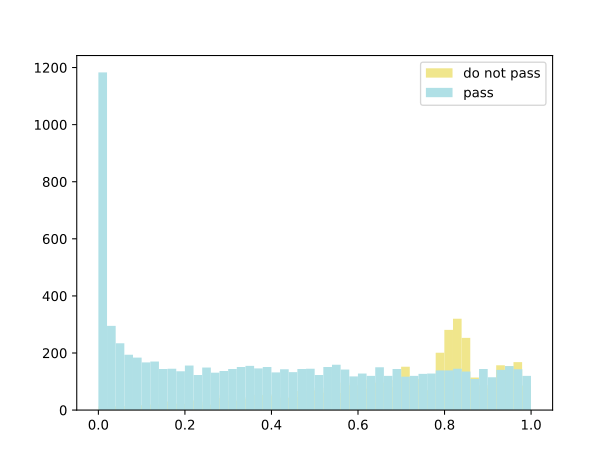
Histogram of p-values for all tests. The area shaded in blue indicates the subset of those that pass the filtering, the area in khaki those that do not pass.
References
C. Ahlmann-Eltze, W. Huber. 2020. glmGamPoi: fitting Gamma-Poisson generalized linear models on single-cell count data. Bioinformatics, 36(24). doi:10.1093/bioinformatics/btaa1009
S. Anders and W. Huber. 2010. Differential expression for sequence count data. Genome Biology, 11:106. doi:10.1186/gb-2010-11-10-r106
K. van den Berge, F. Perraudeau, C. Soneson, M.I. Loce, D. Risso, J.P. Vert, M.D. Robinson, S. Dudoit, L. Clement. 2018. Observation weights unlock bulk RNA-seq tools for zero inflation and single-cell applications. Genome Biology, 19(24). doi:10.1186/s13059-018-1406-4
R. Bourgon, R. Gentleman, W. Huber. 2010. Independent filtering increases detection power for high-throughput experiments. PNAS, 107(21):9546-51. doi:10.1073/pnas.0914005107
R.D. Cook. 1977. Detection of inferential observation in linear regression. Technometrics, 19(1):15-18. doi:10.2307/1268249
D. Gerard, M. Stephens. 2020. Empirical Bayes shrinkage and false discovery rate estimation, allowing for unwanted variation. Biostatistics, 21(1):15-32. doi:10.1093/biostatistics/kxy029
J.T. Leek. 2014. svaseq: removing batch effects and other unwanted noise from sequencing data. Nucleic Acids Research, 42(21). doi:10.1093/nar/gku864
Y. Liao, G.K. Smyth, W. Shi. 2013. featureCounts: an efficient general purpose program for assigning sequence reads to genomic features. Bioinformatics, 30(7):923-30. doi:10.1093/bioinformatics/btt656
M.I. Love, W. Huber, S. Anders. 2014. Moderated estimation of fold change and dispersion for RNA-seq data with DESeq2. Genome Biology, 15(12), 550. doi:10.1186/s13059-014-0550-8
D.J. McCarthy, Y. Chen, G.K. Smyth. 2012. Differential expression analysis of multifactor RNA-Seq experiments with respect to biological variation. Nucleic Acids Research 40, 4288-4297. doi:10.1093/nar/gks042
D. Risso, J. Ngai. T.P. Speed, S. Dudoit. 2014. Normalization of RNA-seq data using factor analysis of control genes or samples. Nature Biotechnology, 32(9). doi:10.1038/nbt.2931
M. Stephens. 2016. False discovery rates: a new deal. Biostatistics, 18(2). doi:10.1093/biostatistics/kxw041
J. Storey. 2003. The positive false discovery rate: a Bayesian interpretation and the q-value. The Annals of Statistics, 31(6):2013-2035.
H. Wu, C. Wang, Z. Wu. 2012. A new shrinkage estimator for dispersion improves differential detection in RNA-Seq data. Biostatistics. doi:10.1093/biostatistics/kxs033
Code documentation
|
DESeqDataSet extends AnnData class to store observations (samples) of variables/features in the rows of a matrix. |
|
a class to store a results table |
|
Differential expression analysis based on the Negative Binomial distribution. |
|
Collapse technical replicates in an AnnData or DESeqDataSet |
|
steps for estimating the beta prior variance |
|
Low-level function to fit dispersion estimates |
|
Low-level function to fit dispersion estimates |
|
Low-level function to fit dispersion estimates |
|
Low-level function to fit dispersion estimates |
|
Low-level function to estimate size factors with robust regression |
|
compute and adjust p-values, with filtering |
|
Make a simulated |
|
Likelihood ratio test (chi-squared test) for GLMs |
|
Wald test for the GLM coefficients |
|
Test results and p-value correction for multiple tests |
|
Replace outliers with trimmed mean |
|
Apply a variance stabilizing transformation (VST) to the count data |
|
compute weighted quantiles |